What Happened During the Call? Why Visibility Matters in Voice AI
A voice AI call can look simple from the outside. A customer calls, the AI answers, the conversation happens, and eventually the call ends.
But a lot can happen between those two points.
The call has to connect, the AI has to respond, tools and workflows may need to run, information may be retrieved, a transfer might happen, and the call may end for any number of reasons. When everything works, you may never think about those individual events. When something goes wrong, however, knowing that a call failed is rarely enough.
You need to know what actually happened.
This is where a call event timeline becomes essential.
Introducing KrosAI’s Advanced Event Timeline.
It gives you a detailed chronological view of what happened throughout a call, so you can see each event from start to finish rather than trying to piece together what went wrong from a final call status.
The Visibility Gap in Voice AI
Most platforms provide high-level call information.
You can typically see:
- Call duration
- Call status
- Recordings
- Transcripts
- Basic analytics
While useful, these metrics rarely explain what actually happened during the interaction.
Imagine trying to debug a software application with access to only the final result.
You know whether it worked.
You don't know why it worked.
You don't know why it failed.
You don't know what happened in between.
Yet this is often how teams manage voice AI deployments.
Without deeper visibility, diagnosing issues becomes a slow and frustrating process.
See Every Event During a Call
The Advanced Event Timeline gives builders a second-by-second view of a call.
You can see when the call started, when the phone rang, when the AI picked up, when actions or workflows were triggered, when a transfer happened, and when the call ended.
Instead of looking at a call as one completed event, you can see the sequence that produced the outcome.
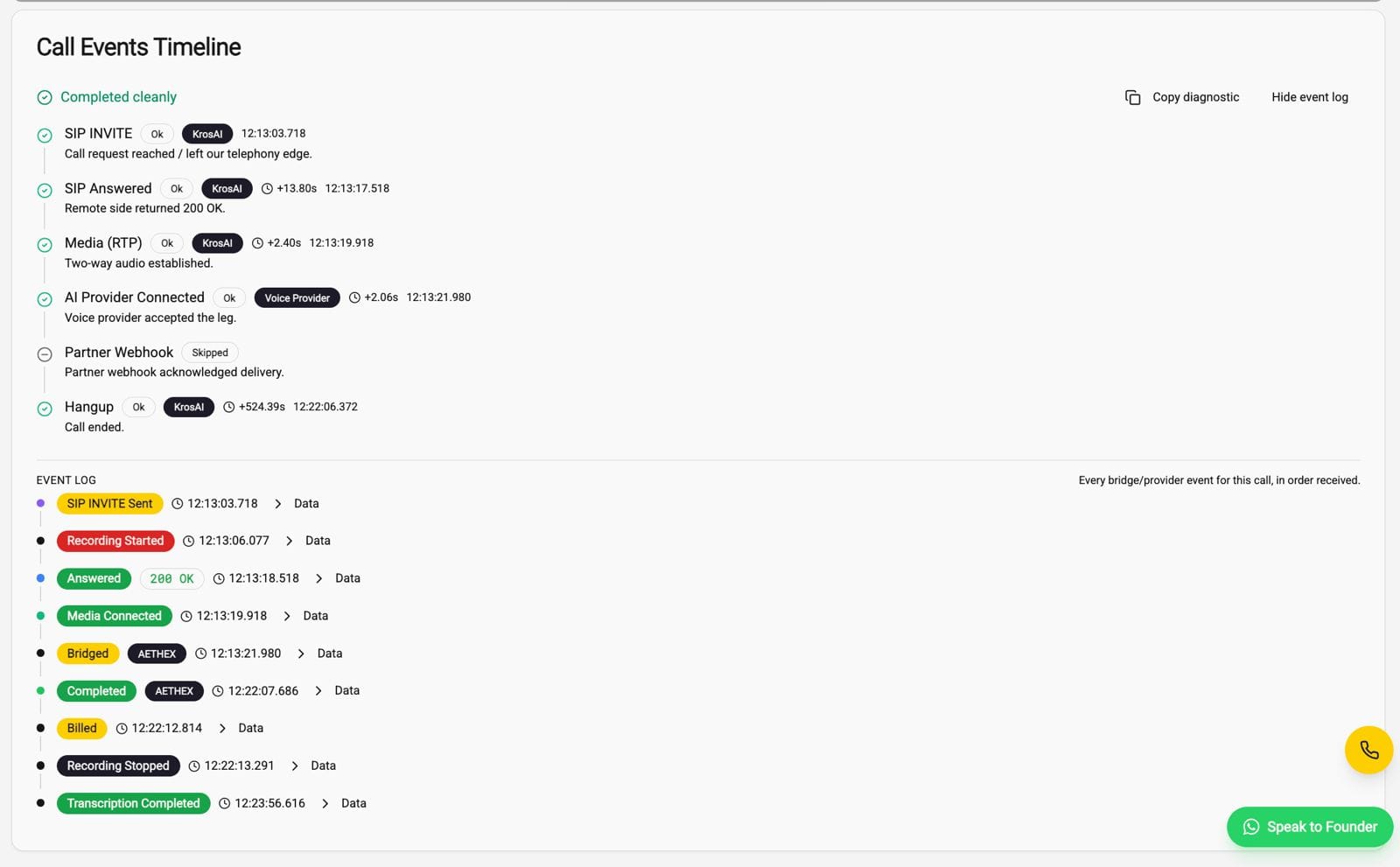
That distinction matters when you're running AI voice applications in production. A call marked as unsuccessful doesn't tell you whether the problem happened while connecting the call, during the agent's interaction, when an external action was triggered, or during a transfer.
The timeline gives you that missing context.
Knowing a Call Failed Isn't Enough
Imagine an AI agent is supposed to collect information from a caller and then transfer them to a human representative.
The call appears in your dashboard as completed, but the customer never reaches the representative.
Without detailed event information, you may have to listen to the recording, check the transcript, inspect other logs, and try to work out where the process broke.
With an event timeline, you can follow the sequence of events and identify where the expected action stopped happening.
That's the difference between knowing that something happened and understanding what happened.
Debug Voice Workflows Without Guessing
AI voice applications rarely operate on the AI model alone.
A single call can involve telecom infrastructure, the voice agent, APIs, external tools, workflows, transfers and other services. When several systems are involved, troubleshooting can quickly become complicated.
The Advanced Event Timeline gives developers a clearer way to trace that chain.
If a workflow breaks, you can look at the events leading up to the failure. If a transfer doesn't happen, you can see what happened before it. If a call ends unexpectedly, you have more context for investigating why.
That makes debugging less about guessing and more about following the actual sequence of events.
Understand the Customer Experience
There is another side to visibility: understanding what the caller experienced.
A transcript tells you what was said. A recording lets you hear the conversation. But neither necessarily tells you everything that happened operationally during the call.
The event timeline adds that layer of context.
For example, you might notice that a caller had to wait before being transferred, that an expected action happened later than it should have, or that a workflow stopped before the conversation reached its intended outcome.
When you can see those moments alongside the conversation itself, it becomes easier to understand where friction entered the customer experience.
Improve AI Agent Performance
Visibility also becomes useful beyond individual troubleshooting.
When you're handling a large number of AI-powered calls, patterns start to matter.
You may notice recurring transfer failures, workflows that consistently break at a particular point, calls that terminate unexpectedly, or delays around specific actions.
Those patterns can point to areas where the voice agent or the underlying workflow needs improvement.
AI Voice Needs Observability Too
As AI voice applications become more sophisticated, simply knowing whether an agent answered a call isn't enough.
Builders need to understand the behaviour of the entire voice workflow: what happened, when it happened, and how each event contributed to the final outcome.
That's essentially what observability brings to AI voice.
The goal isn't to collect more information for the sake of having more dashboards. It's to make that information useful when you're building, debugging and improving a voice application.
Gain complete visibility into every AI-powered conversation with KrosAI's Advanced Event Timeline.